


Items marked by the "Google Assistant" tag:
Products
Articles
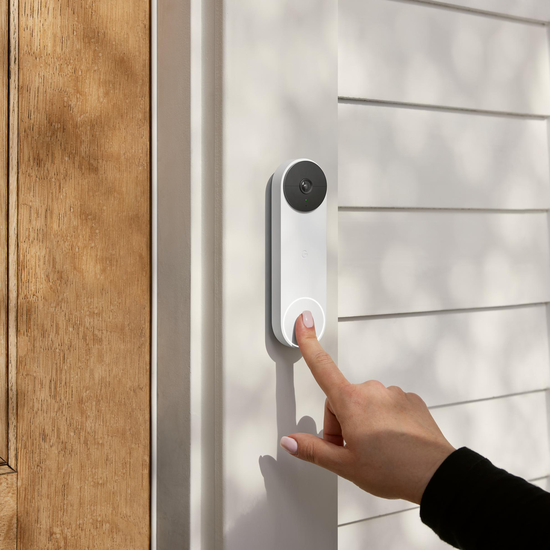
Google Nest Cam (battery) and Google Nest Doorbell (battery) are the latest additions to the Nest family — and they’re Nest’s first battery-powered security devices, built for every home. Here are 11 things to know: Smarter alerts, right out of the box: Your new Nest Cam and Doorbell can do more right out of the box because we moved object detection on-device, allowing us to include features that are usually behind a subscription (like Activity Zones and smart alerts, including package, animal, vehicle and person detection) for no additional cost, plus three hours of event video history. Thanks to on-device processing, they can also record up to a week’s worth of events if power or Wi-Fi is out. Made with Machine Learning: Building a camera that uses ML to recognize objects requires showing the ML model millions of images first. Our new Nest Cameras and Doorbells have been trained on 40 million images to accommodate lots of different environments and lighting conditions. Thanks to a cutting edge TPU chip, our new cameras run an ML model up to 7.5 times per second, so reliability and accuracy are even better. Works in any home: Nest Cam and Doorbell’s wire-free designs, built-in rechargeable batteries and optional power connectors allow you to install them where you want — not only where there’s a power outlet or pre-existing wiring. Set up your way: More accessories are coming soon. In addition to weatherproof cables, a tabletop stand with a power cord allows you to place your Nest Cam on an indoor surface, like a mantle. There’s also an anti-theft mount that tethers your Nest Cam to the magnetic mount for extra security. For Nest Doorbell, there’s a horizontal wedge and an AC adapter. Works better, together: Nest Cam and Nest Doorbell seamlessly work with your Nest displays. Just say “Hey Google, show me the backyard” to see your Nest Cam feed. And you can set up your speakers and displays to chime when someone rings your Nest Doorbell, while using your display to see who’s at the door and take action from the screen. All on the Google Home app: It’s easy to see all of your events quickly, and your 24/7 live feed at any time in the Google Home app. If you have more than one Nest camera, you can view all of them in one place, alongside your other connected home devices. You can even filter by event type — for example, you can pull up every package delivery. See clearly in a variety of conditions: Both Nest Cam and Nest Doorbell have night vision, 6x zoom, and HDR so images are crisp in the dark or bright light. And we gave Nest Doorbell a taller field of view so you can see visitors from head to toe and packages as close as eight inches away from your door. Extra secure with a Google account: Your devices are only as secure as your account. That’s why the new Nest Cam and Nest Doorbell require a Google account, which comes with added protections like suspicious activity detection, 2-step verification and password checkup. Add a Nest Aware subscription: With a Nest Aware subscription ($6 monthly), you’ll get familiar face detection and the ability to call 911 from the Google Home app (U.S. only) as well as 30 days of event video history. With a Nest Aware Plus subscription ($12 monthly), you’ll get all of this with 60 days of event video history and the option for 10 days of continuous video recording when your Nest Cam is plugged into a power outlet. Made with care: Nest Cam and Doorbell are made with recycled materials and rigorously tested through drops and extreme weather, like heavy rain and hurricane-strength winds. Built for your life: Nest technology is designed to fit into your home, not distract from it. Nest Cam is sleek and white and fits in anywhere — indoors or outdoors. And Nest Doorbell’s design was inspired by clean, minimalist architecture. In the U.S., it comes in four different colors so your front door can make a great first impression. The new battery-powered Nest Cam and Nest Doorbell are available for pre-order today for $179.99. Order yours today!
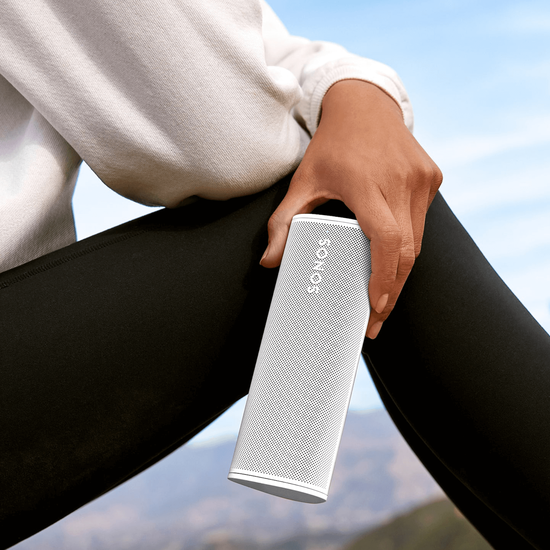
Sonos’ first portable speaker, the Move, sure sounded great, but it was as big and heavy as a bowling ball, and it came saddled with an appropriately hefty price tag. For its second portable, Sonos is trimming the bulk and slashing the sticker price, and the result might be Sonos’ most appealing speaker yet. Slated to arrive next month for $169, the Roam (which was thoroughly leaked late last week) is much less expensive than the $399 Move, yet retains all the features that make Sonos speakers so appealing. The new model is just 6.6 inches tall and weighs slightly less than a pound, which (according to Sonos) makes it about a sixth the size and heft of the Move. Put another way, the Roam is slightly smaller than a 500ml water bottle. Sonos unveiled the Roam during a virtual event on Wednesday. We haven’t had the chance to see or hear the Roam in person, but here’s what we gleaned from Sonos’ online briefing. Automatic Wi-Fi-to-Bluetooth switching, Sound Swap, and music streaming services Like the Move, the Sonos Roam connects to both Wi-Fi and Bluetooth, but it’s also been designed to seamlessly transition between the two. For example, if you grab the Roam for a road trip while it’s connected to your home’s Wi-Fi network, it will switch automatically to your phone’s Bluetooth connection once it leaves Wi-Fi range, and it’ll switch back as soon as you return home. Two Roams can be paired for stereo performances, and you can quickly group the Roam with your other Sonos speakers by pressing and holding the play/pause button. Keep holding play/pause button and you’ll trigger a new feature called Sound Swap, which automatically “throws” music from the Roam to the nearest Sonos speaker. The Sonos Roam can automatically switch between Wi-Fi and Bluetooth, while its Sound Swap feature lets you “throw” music from the Roam to another Sonos speaker nearby. As with other Sonos speakers, the Sonos Roam can stream music from more than 100 streaming music services, including Apple Music, Spotify, Amazon Music, Audible, Deezer, Pandora, TuneIn, iHeartRadio, Google Play Music, and YouTube Music, as well as the ad-supported Sonos Radio and subscription-based Sonos Radio HD. The Sonos Roam also supports audio casting via AirPlay 2, but not Chromecast. Auto Trueplay: Now on Bluetooth, too Besides its seamless network transitions and Sound Swap capabilities, the Roam improves on Auto Trueplay, an EQ feature that automatically tunes the speaker to its surroundings. Trueplay has been available in Sonos speakers for many years, but this automatic version was first introduced with the Move. Auto Trueplay uses the speaker’s mic array to detect the acoustics of a room or even an outdoor environment, and then optimizes the sound accordingly. Trueplay on non-portable Sonos speakers senses the unit’s surroundings using the microphone on an iOS device. While Auto Trueplay was a Wi-Fi-only feature on the Move, it will work on both Wi-Fi and Bluetooth on the Roam, meaning Auto Trueplay can optimize the speaker’s audio even when you’re out and about. Oh, and don’t worry, Move users; Sonos says that the Move a coming firmware update will bring Auto Trueplay via Bluetooth to the Move as well. Design and drivers Available in shadow black and lunar white, the Roam’s IP67-rated shell is designed to completely resist dust and survive a 30-minute dunk in up to a meter (about three feet) of water. The Sonos Roam’s IP67-certified shell should be completely resistant to dust ingress, and it’s also designed to withstand being dunked in a meter of water for 30 minutes. Inside the Roam’s shell sit two drivers: a custom racetrack mid-woofer and a tweeter. Each driver is powered by its own Class H amplifier, a departure from the Class D amps that power most portable speakers. On top of the speaker are three raised buttons (another departure for Sonos, which usually favors flat buttons) for play/pause and volume control, while a far-field microphone array lets you chat with either Amazon Alexa or Google Assistant (you can install either one or the other, but not both at the same time). Incidentally, both the top and bottom of the Roam have a concave design, in part to thwart accidental button pushes if the speaker takes a tumble. Battery life and charging Sonos says the Roam will have up to 10 hours of battery life, and it can retain its charge for up to 10 days thanks to a low-power sleep mode that engages as soon as playback stops. Sonos promises that the Roam can wake from its low-power mode in less than a second. An optional magnetic charging dock for the Sonos Roam will cost $49. You can charge the Roam in one of two ways: via its USB-C charging port (a cable is included, but not an AC adapter) or Qi wireless charging. Sonos is offering a nifty-looking but pricey magnetic charging dock as a $49 accessory. Look for the Sonos Roam to ship on April 20, and you can pre-order now. Stand by for our full review once we test one out.
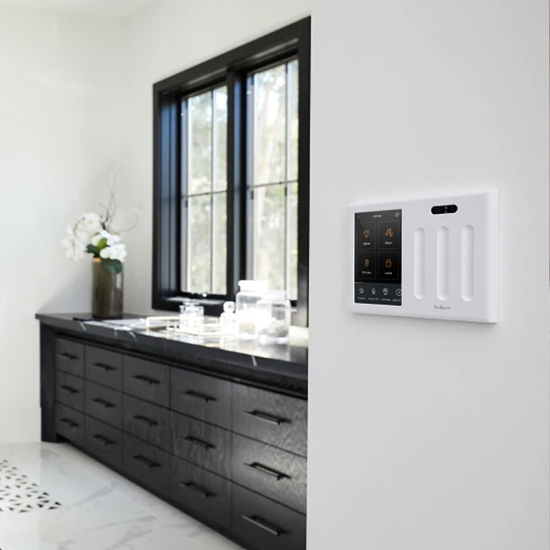
With so many smart home products out there, deciding which are the best for you and your home is not always easy. The foundation for any home to work together, is to have a system in place. That’s why we created the Brilliant Smart Home System and work with over 20 of the brands you love and trust. We're here to help you customize your home with devices that fit your lifestyle, make life easier, and help you live more connected. First, here are some questions to ask yourself: What smart home technology do I already have? Is home security a priority? How often am I away from my home? Do I need home automation? Who uses my home & how accessible do I want my home to be for them? Check out these three packages of smart home devices to help you decide what products would work best in your home: Every smart home should have a central hub, system, or platform that makes your ecosystem of products work better together. (Hint: We recommend Brilliant) A smart thermostat like Nest or Ecobee makes it easy to automate your home’s climate to ensure you’re only using the energy you need and that your home is always comfortable. A Ring doorbell adds a level of security to your home so that you not only have an inside view of your home using Brilliant’s built-in camera, but also an outdoor one. You can see who’s at your front door and speak to them through Brilliant. By introducing a smart lock like the Schlage Encode to your mix of smart home devices, you lock/unlock the door. Plus, when it’s connected to a Ring doorbell you can see, speak to, and manage home access, making it the ultimate combination of products for home safety. A smart garage door opener like Genie’s Aladdin Connect expands the automation of your home’s access points. BONUS: Genie's Aladdin Connect can be retrofitted to fit most garage doors. Brilliant’s Smart Dimmer Switch or any of our compatible switches, make it easy to put smart lighting throughout your home without the added cost and maintenance of smart bulbs. Control your entire home’s ambiance with any Sonos speakers and listen to all of your favorite music streaming services like Apple Music, Spotify, Pandora, and more. You can even group speakers directly from Brilliant.
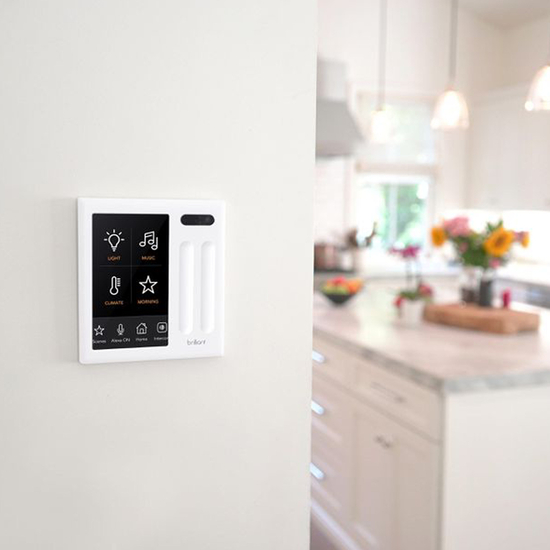
Automated Now is a proud dealer of Brilliant Control, a smart lighting solution that gives anyone in the house the ability to access music, climate, and other common smart home devices with just a simple touch or voice command — no smartphone required. Replacing existing light switches, the Brilliant Control installs in minutes and features a touchscreen that is beautiful and intuitive to operate. "While renovating my house, it was important to me that anyone in any room could adjust lighting, music, and climate control as easily as flipping a light switch. Requiring a mobile phone and apps to adjust your environment is clumsy, and for guests or children, it's impossible. But every available system in the market costs tens of thousands of dollars and takes weeks to install, and still doesn't bring control to every room. We knew there had to be a better solution," said Aaron Emigh, co-founder and chief executive officer of Brilliant. "That's why we invented the Brilliant Control. It is affordable, can be installed in minutes by replacing an existing light switch, and provides a beautiful and intuitive solution that everyone in the home can use throughout the home." In addition to touch, motion, and voice control capabilities each Brilliant Control comes with a built-in camera, privacy cover, and microphone, making it easy to add video or voice intercom to a house. When not in use, the Brilliant Control invites users to personalize their home, displaying motion art or family photos to add a touch of fun and relaxation. New seasonal nature scenes and theme packs are available monthly for fresh, updated options. Brilliant Controls also come with Amazon Alexa built in, making it easy to get weather forecasts and sports scores, or quickly add items to your Amazon shopping list. You can also create favorite "scenes" to instantly set the mood in each room for waking up, dinner, or relaxing. Brilliant Controls work with dozens of smart home services and devices including Nest, Sonos, Philips Hue, Ring, SmartThings, Honeywell, security systems, and countless others.