


Control4 Driver - Roborock Vacuum & Mop Integration


- — Expert offsite programming
- — All work done remotely
- — No-contact service
- — No house-call needed
- — Custom 3rd party driver
BRING ROBOROCK INTO CONTROL4
Advanced robot vacuum and mop integration with live mapping, local IP control, intelligent cleaning automation, dock management, and real-time feedback.
SMARTER CLEANING. SEAMLESS AUTOMATION.
Make your Roborock robot vacuum a natural part of your Control4 smart home.
The Chowmain Roborock Driver for Control4 provides advanced two-way integration for compatible Roborock robot vacuums and mops, including supported models from the S, Qrevo, and Saros product families.
Control your robot vacuum directly from Control4 touchscreens, the Control4 mobile app, programmable keypads, or Composer Pro. Start cleaning the entire floor, select individual rooms, clean saved zones, run existing Roborock routines, and monitor cleaning progress without switching between separate applications.
The driver communicates directly with compatible Roborock robots over the local home network, providing fast everyday control without requiring a constant internet connection. Roborock's cloud is used for account authentication, robot discovery, live map retrieval, and automatic fallback when local communication is unavailable.
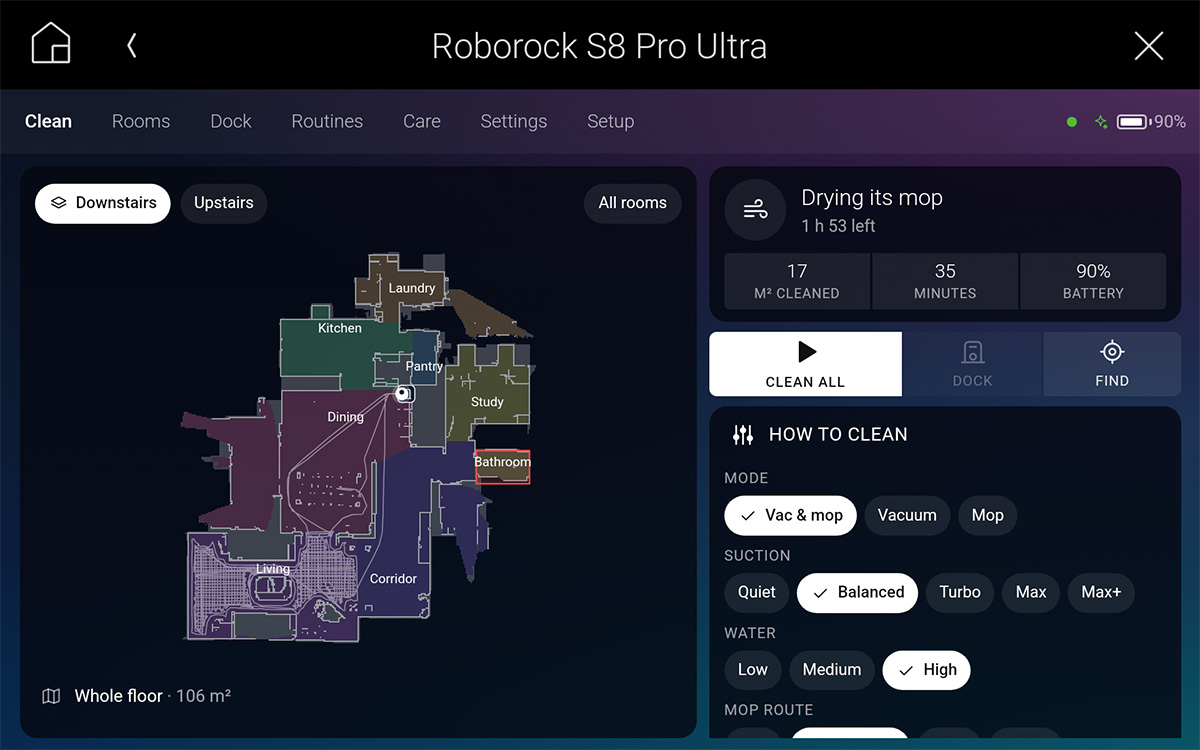
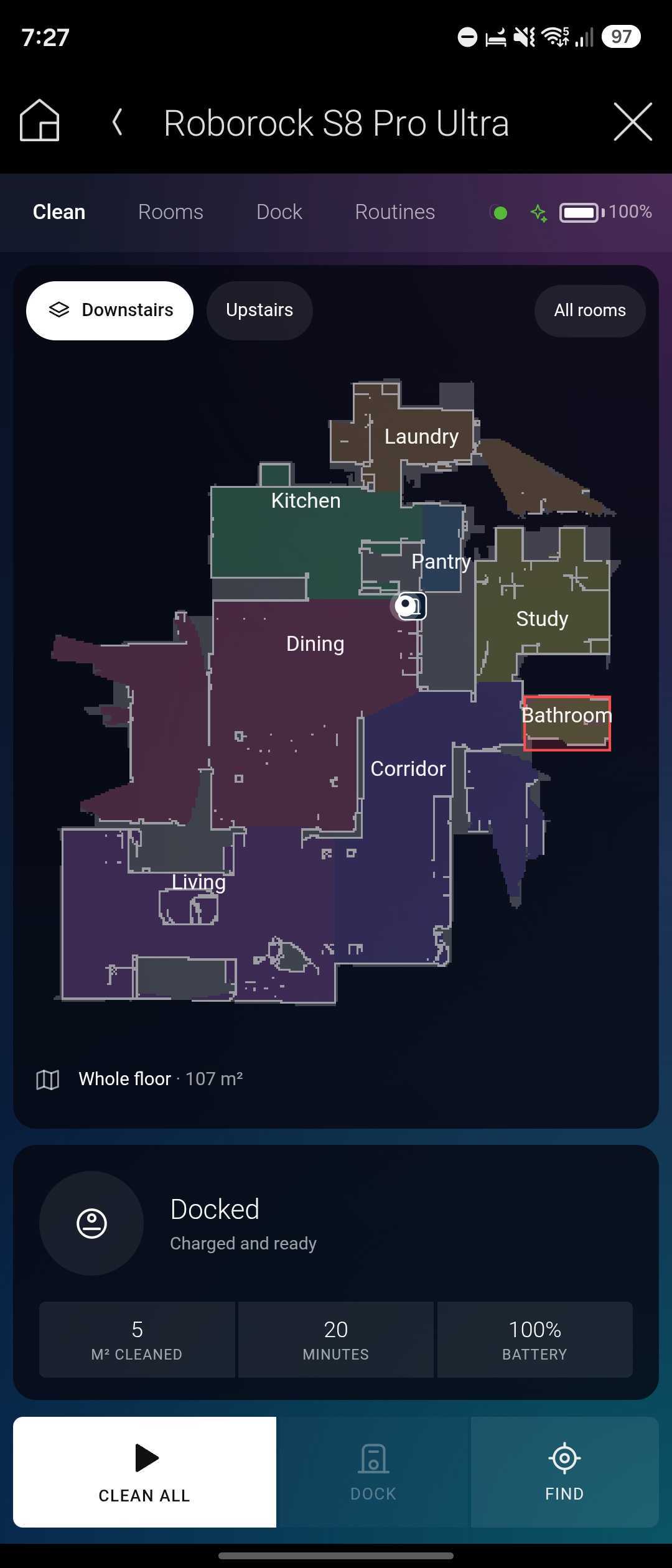
A dedicated graphical interface displays the robot's live map, current position, cleaning path, room information, battery level, cleaning progress, and estimated time remaining. Additional controls provide access to cleaning modes, dock functions, maintenance information, schedules, and supported robot settings.
Each Roborock robot receives its own Control4 driver instance, allowing multiple robots throughout a home to operate independently while remaining part of the same automation system.
LOCAL TWO-WAY IP CONTROL
Communicates directly with compatible Roborock robots over the home network for responsive cleaning commands and real-time status feedback. Choose Local First, Local Only, or Cloud Only communication modes. Cloud connectivity provides automatic fallback when the robot cannot be reached locally.
INTERACTIVE LIVE CLEANING MAP
View the robot's live map with individual rooms, current position, charging dock, cleaning path, no-go zones, and invisible walls. Monitor cleaning progress, remaining time, and the current room. Supported multi-floor robots provide separate maps and floor selection.
ADVANCED ROOM & ZONE CLEANING
Clean an entire floor, select individual rooms, choose multiple rooms in a specific order, or activate saved cleaning zones. Configure supported suction levels, water settings, mop routes, cleaning passes, and specialized modes such as SmartPlan and vacuum-then-mop.
ENHANCED CONTROL4 INTERFACE
Access a dedicated graphical control interface from Control4 touchscreens and the Control4 mobile app. Optimized layouts support tablets, T4 touchscreens, and phones. The same live interface is available directly within Composer Pro's Control tab.
INTELLIGENT DOCK MANAGEMENT
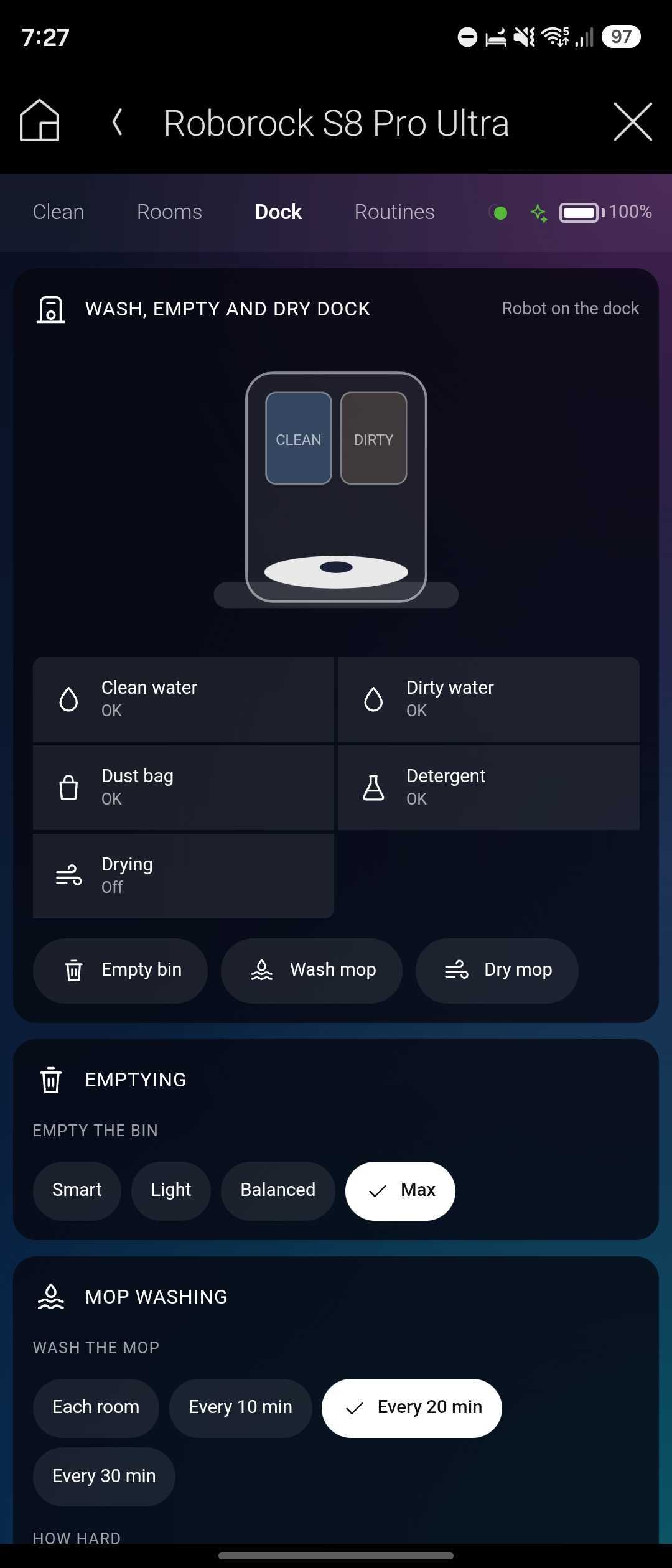
Control supported automatic docking functions, including dustbin emptying, mop washing, and mop drying. Monitor available dock information such as water tank status and dust bag conditions. Available controls automatically adapt to the capabilities of the connected robot and dock.
ADVANCED AUTOMATION & FEEDBACK
Use more than 25 programming commands, 20 events, and extensive variables and conditionals to integrate cleaning into your Control4 system. Monitor robot state, battery level, cleaning progress, current room, floor, maintenance requirements, and more.
BUILT FOR INTELLIGENT HOME AUTOMATION
Turn everyday cleaning into a coordinated part of your Control4 smart-home experience.
ONE-TOUCH CLEANING
Assign cleaning functions to Control4 keypads, touchscreens, or custom programming. Start or pause cleaning, return the robot to its dock, locate the robot, empty its dustbin, or activate one of two assigned routines. Keypad LED colors can indicate cleaning, paused, docked, and needs-help states.
EVENT-BASED AUTOMATION
Create intelligent responses to robot activity using Control4 programming events. Trigger automation when cleaning starts or finishes, when the robot enters a room, returns to its dock, encounters a problem, or goes offline.
REAL-TIME STATUS & NOTIFICATIONS
Monitor battery level, current room, cleaning progress, time remaining, and maintenance conditions. Configure push and email notifications for completed cleaning, low battery, dust bag alerts, water tank conditions, maintenance requirements, and robot errors. Notification delivery requires Control4 4Sight.
PUT YOUR SYSTEM TO WORK
Make automated cleaning part of your everyday smart-home routines.
LEAVING HOME CLEANING
Use Control4 programming to start a compatible Roborock cleaning routine when the home's Away mode is activated. Select specific rooms or run an existing Roborock routine to clean while the home is unoccupied.
SMART KEYPAD CONTROL
Assign a Control4 keypad button to start or pause cleaning. Use programmable LED feedback to indicate whether the robot is cleaning, paused, docked, or requires attention. Additional buttons can return the robot to its dock or activate saved routines.
INTELLIGENT CLEANING NOTIFICATIONS
Receive a Control4 notification when cleaning finishes, the robot encounters an error, the dust bag is full, or a water tank needs attention. Use programming events to coordinate other smart-home actions with cleaning activity.
POWERFUL FEATURES. SIMPLE INTEGRATION.
Comprehensive Roborock control and feedback designed for professional Control4 installations.
Roborock Account Authentication: Sign in using the homeowner's Roborock account and a verification code delivered by email. The driver does not request or store the homeowner's Roborock password.
Flexible Authentication: Account sign-in can be completed through Composer Pro or supported Control4 touchscreens and mobile interfaces. Homeowner-facing sign-in can be disabled when preferred.
Automatic Robot Discovery: Discover compatible Roborock robots associated with the authenticated account and select the appropriate robot for each driver instance.
Multiple Robot Support: Install one driver instance for each compatible robot. Multiple robots on the same Roborock account can operate independently within a single Control4 project.
Dynamic Feature Detection: The driver reads the capabilities of each connected robot and automatically adjusts available commands, properties, events, and interface controls. Unsupported features are hidden.
Local Network Communication: Everyday commands and status updates communicate directly with compatible robots over the local network. Supported cleaning functions continue operating when internet access is temporarily unavailable.
Cloud Fallback: Roborock's cloud is used for account authentication, robot discovery, live map retrieval, and remote communication when the robot cannot be reached locally.
Selectable Communication Modes: Configure Local First, Local Only, or Cloud Only operation according to installation requirements.
Interactive Live Maps: View room boundaries, robot position, charging dock, cleaning path, no-go zones, and invisible walls. Select rooms directly from the map for targeted cleaning.
Multi-Floor Mapping: Access saved maps for supported robots that remember multiple floors. Switch between available floor maps using the interface or programming.
Cleaning Progress Feedback: Display the percentage of cleaning completed, estimated minutes remaining, current room, cleaned area, and other available information.
Whole-Home Cleaning: Start a complete cleaning cycle using supported robot cleaning modes.
Room-by-Room Cleaning: Select individual rooms or multiple rooms in a specific sequence. Configure supported room-specific cleaning preferences.
Saved Zone Cleaning: Activate saved cleaning zones created in the Roborock environment.
Advanced Cleaning Modes: Control supported suction settings, water flow, mop routes, cleaning passes, SmartPlan, Max+ suction, vacuum-then-mop operation, and additional model-specific features.
Per-Room Cleaning Preferences: Apply supported cleaning settings to individual rooms, including suction level, water usage, mop route, and cleaning passes.
Dock Automation: Trigger supported automatic dustbin emptying, mop washing, and mop drying functions. Start or stop drying where supported.
Dock Status Monitoring: Monitor available information about dust bags, clean water tanks, dirty water tanks, and supported dock maintenance conditions.
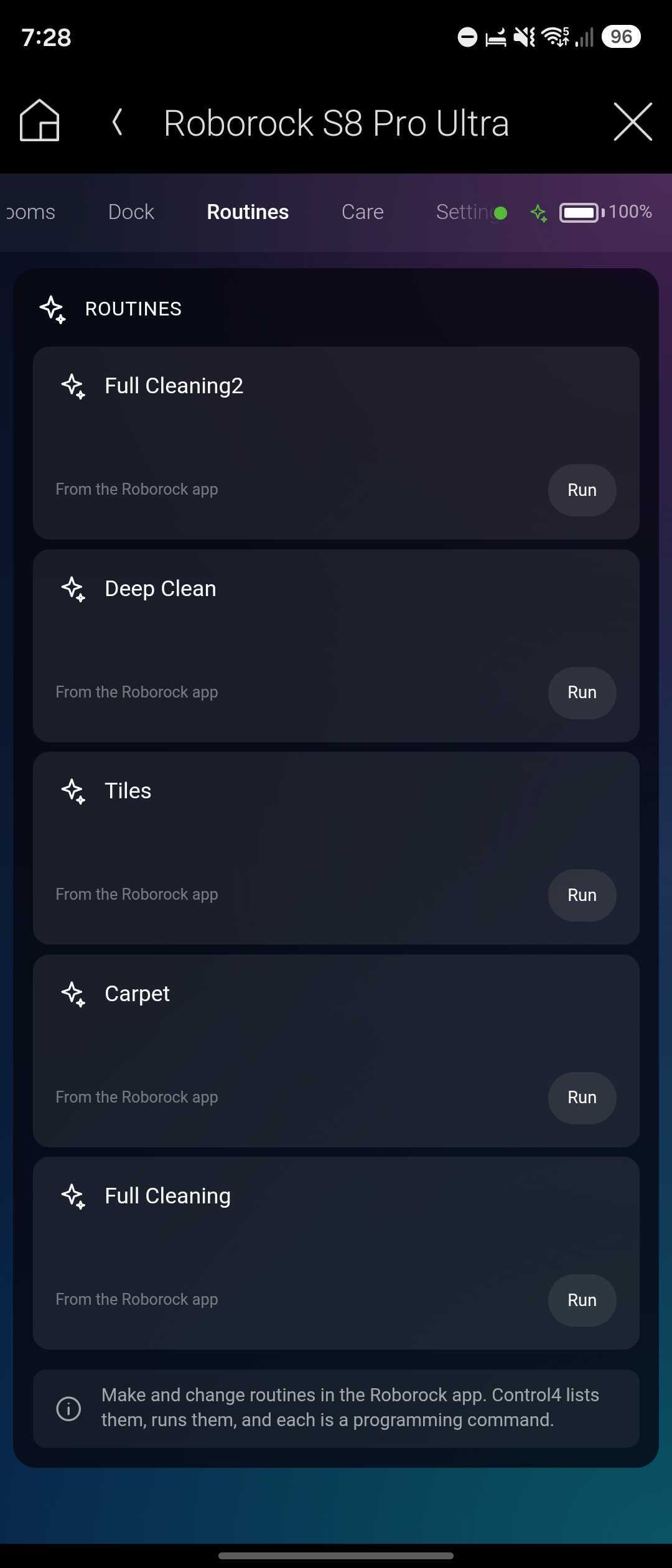
Roborock Routines: Run routines previously created in the Roborock app from Control4 interfaces, keypads, or programming.
Schedule Management: Enable or disable existing Roborock schedules. Schedule creation and editing remain in the Roborock app.
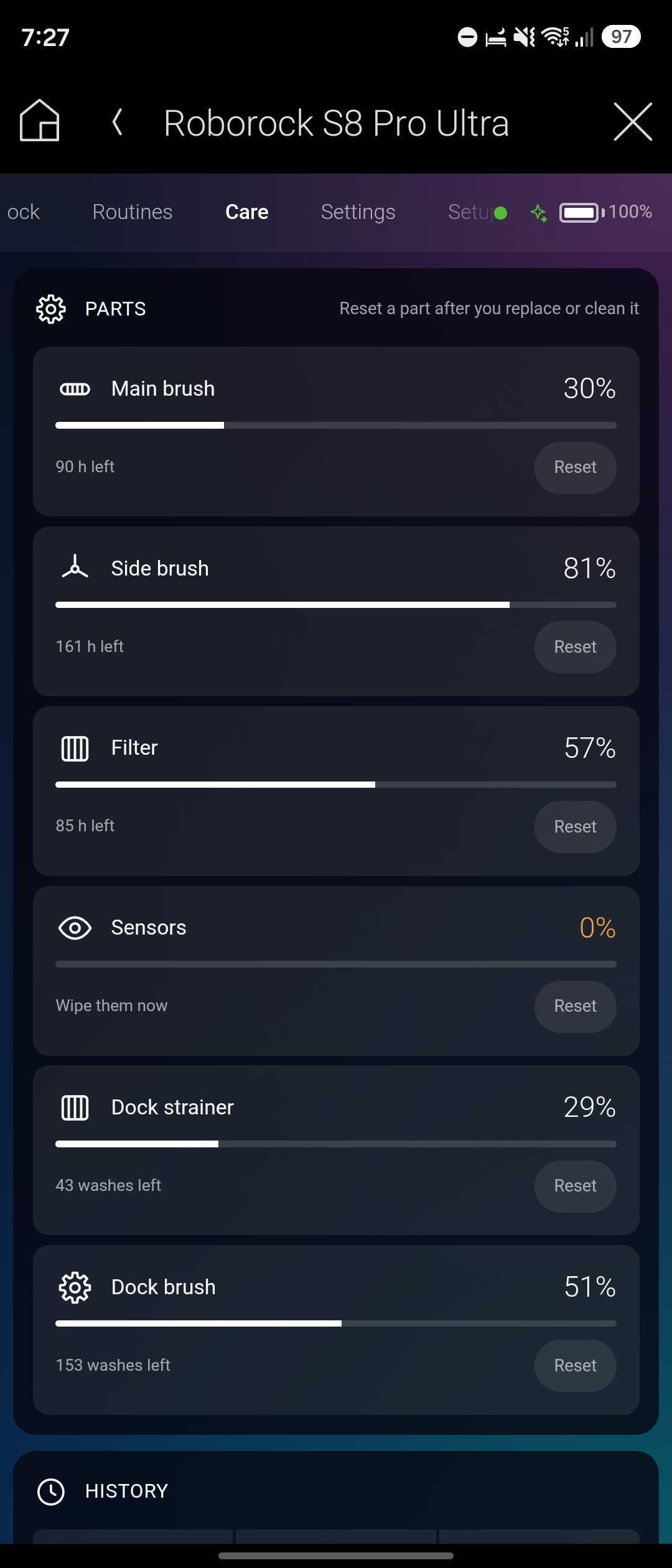
Maintenance Monitoring: View remaining service life for supported maintenance items, including main brushes, side brushes, filters, sensors, mop pads, and dust bags.
Maintenance Reset: Reset supported maintenance counters after replacing or servicing the corresponding components.
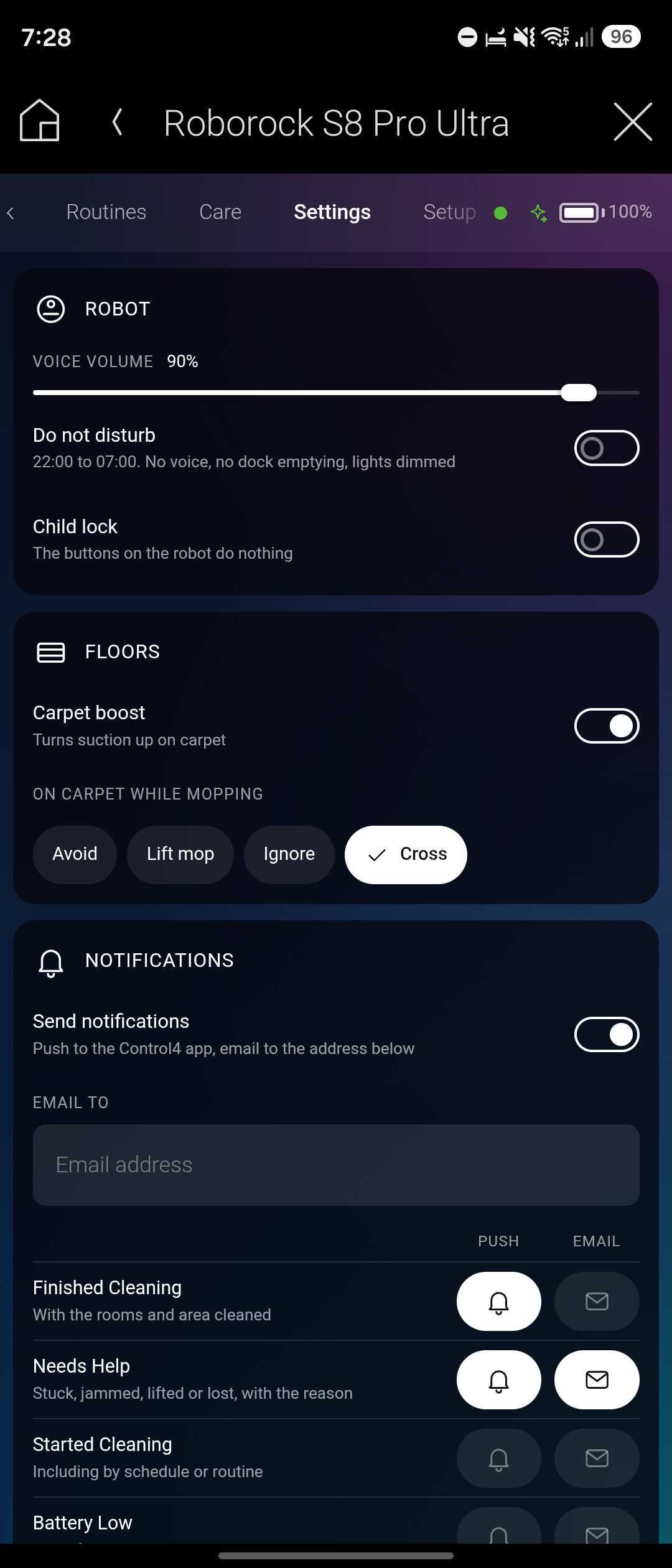
Robot Settings: Access supported settings such as Do Not Disturb, child lock, voice volume, carpet handling, and additional robot-specific options.
Control4 Touchscreen Interface: Dedicated graphical control layouts are available for compatible Control4 touchscreens, tablets, and mobile devices.
Composer Pro Control Interface: Access the same interactive robot control interface directly from the driver's Control tab in Composer Pro. Select an appropriate display size for testing and configuration.
Dynamic Navigator Icon: The robot's icon in Control4 rooms can display its current operating state or battery level.
Configurable Notifications: Configure individual notifications as Off, Email Only, Push Only, or Both. Supported alerts include cleaning completion, cleaning started, low battery, robot errors, maintenance requirements, dust bag conditions, water tank status, and offline events. Control4 4Sight is required.
Keypad Integration: Assign Clean/Pause, Return to Dock, Locate, Empty Bin, and two routine actions to compatible Control4 keypad buttons.
Keypad LED Feedback: Configure LED colors to indicate cleaning, paused, docked, and needs-help conditions.
20 Programming Events: Trigger automation using events such as Started Cleaning, Finished Cleaning, Returned to Dock, Entered a Room, Needs Help, Dust Bag Full, and Went Offline.
Extensive Variables & Conditionals: Access robot state, battery level, current room, current floor, cleaning progress, remaining minutes, cleaned area, and additional available status information.
25+ Programming Commands: Execute commands such as Clean Rooms, Clean Saved Zone, Run Routine, Load Floor, Set Suction, and other supported robot functions.
Composer Pro Status: Monitor robot state, battery level, errors, cleaning progress, current room, dust bag status, and water tank information directly in Composer Pro.
Professional Diagnostics: Includes diagnostic actions to assist with configuration, troubleshooting, and ongoing support.
COMPATIBILITY & SYSTEM REQUIREMENTS
Important information for planning a successful Control4 and Roborock integration.
Supported Roborock Models: Compatible Roborock robot vacuums and mops using the standard Roborock protocol, including supported models from the S, Qrevo, and Saros product families.
Unsupported Roborock Models: The Roborock Q7 and Q10 series use a different protocol and are not currently supported.
Other Roborock Products: Robot lawn mowers, wet/dry vacuums, washing machines, and other non-robot-vacuum products are not supported.
Control4 Operating System: Control4 OS 3.4.3 or later is required.
Controller Compatibility: Control4 HC-XXX series controllers are not supported.
Roborock Setup: The robot must be configured in the Roborock app before integration.
Local Network: The robot and Control4 controller must be connected to the same local network for direct local communication.
Internet Access: Internet connectivity is required for Roborock account authentication, robot discovery, live map retrieval, and cloud-based communication.
Control4 4Sight: Required for push and email notifications.
Multiple Robots: Install one driver instance per robot.
Feature Availability: Available functions depend on the specific Roborock model, firmware, dock capabilities, and supported protocol features.
Installation: Professional Control4 Composer Pro configuration is required.
DRIVER INFORMATION
MAKE ROBOROCK PART OF YOUR SMART HOME
Experience intelligent robot vacuum and mop control with interactive cleaning maps, room-by-room automation, dock management, real-time status feedback, and powerful Control4 programming.
Automated Now provides professional Control4 driver installation, configuration, and remote programming services to help integrate compatible Roborock devices into your smart-home system.
Bring automated cleaning into your everyday routines with the Chowmain Roborock Driver for Control4.
No posts found